Posts

Password Resilience

Image
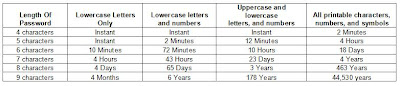
In January I blogged an entry on creating strong passwords ( http://clevelanddotnet.blogspot.com/2007/01/strong-password.html ). As a follow-up, I found some data to help justify the need for a strong password. Listed below is a chart (courtesy of LastBit Corp) that details how well a password can withstand a "crack attack" from a hacker.

Web Services Resources

As a follow-up to our last user group meeting, listed below are some resources that can be used for creating and debugging web services. Fiddler This utility allows you to inspect all HTTP Traffic, set breakpoints, and "fiddle" with incoming or outgoing data. To learn more about Fiddler or to download it, go to http://www.fiddlertool.com/fiddler/version.asp . Internet Explorer Developer Toolbar Beta 3 The Microsoft Internet Explorer Developer Toolbar provides a variety of tools for quickly creating, understanding, and troubleshooting Web pages. This version is a preview release and behavior may change in the final release. To download the IE toolbar, go to http://www.microsoft.com/downloads/details.aspx?FamilyID=e59c3964-672d-4511-bb3e-2d5e1db91038&displaylang=en XML Developer Center The Microsoft XML Developer Center offers resources on editing, validating, and using XML data. This includes utilities, articles, and blogs. To visit the Developer Center, go to http://msdn....
Resolvoing the error "The file could not be uploaded into the Web Forms designer."

Image
Q: I received the following error ("The file could not be uploaded into the Web Forms designer.") when I opened a VS project, but I don't remember making any changes to the form design or the HTML? A: Try to compile the project and see if there's an error in the code behind file (i.e. .CS or .VB file). If there are errors resolve them, and you should be able to view the file.

Zune Giveaway

During our March meeting, we will have a drawing for a Zune , courtesy of Microsoft. To enter the drawing, simply attend the C#/VB.Net user group meetings. For each meeting you attend between now and the end of March, you will be entered into the drawing. In addition, your name will be entered into the drawing an additional time for each new person you bring to the meeting. To find out more about upcoming meetings, go to www.ClevelandDotNet.info .

February .Net Events

Listed below is a summary of the .Net events scheduled for this month. Attend a few and increase your .Net knowledge! Feb 8th: SQL User Group - "Visual Studio 2005 Team Edition for Database Professionals" http://www.bennettadelson.com/technicalresources/sqlsig.aspx Feb 13th: .Net User Group - "Building ASP.NET AJAX Enabled Websites" http://www.bennettadelson.com/technicalresources/sig.aspx Feb 20th: Presentation - "Mobilize Your Business: Using Microsoft Solutions to Keep Your Business on the Move" http://www.berbee.com/public/events/MS_MobilizeYourBusinessCleveland.aspx Feb 27th: C#/VB.Net User Group - "XML Web Services" http://www.clevelanddotnet.info

You’re invited to attend a Berbee and Microsoft Seminar on Mobile Solutions

Mobilize Your Business: Using Microsoft Solutions to Keep Your Business on the Move You’re invited to attend a Berbee and Microsoft Seminar As a Microsoft Gold Certified Partner, Berbee is pleased to invite you to the special event "Mobilize Your Business: Using Microsoft Mobile Solutions to Keep Your Business on the Move." Attend this two-hour session and discover how Microsoft® supported mobile solutions can make your mobile workforce more productive.Advanced Technology in Action to Solve Today’s Business ProblemsDoes your team need to stay in the know while on the go? Mobile solutions can help your people get to work without being at work. Through business scenarios, case studies, and product demos, this event will show how Microsoft technologies can help your business to:* Enable productivity away from the office* Provide on-the-go access to corporate data* Respond more quickly to customers, partners, and colleaguesAttend This Unique Event for a First-Hand View Don’t miss...

Strong Password

Listed below are the requirments for making a password strong and more difficult to comprimise. 8 characters minimum No repeating characters Embedded numbers and special characters Avoid common dictionary words Avoid using login name within the password Force users to change passwords every 3-6 months Old passwords should be avoided when changing a current password Users should be repeatedly warned never to share passwords with anyone, including System Administrators. Users can check their own password at http://www.microsoft.com/athome/security/privacy/password_checker.mspx . This is a non-recording web site used to simply check the strength of a password and it’s resilience for being compromised. For more information on strong passwords, go to http://www.microsoft.com/athome/security/privacy/password.mspx